Fresh ideas from museums around the globe in your inbox each week

Editorial update, 10 October 2026: the five steps now focus on visitor tasks, accessible journeys and useful outcomes. Older diagrams and the social-plugin screenshot are retained with context.
People often visit museum websites to find practical information about opening hours, exhibitions, programmes and collections. Begin with those needs. A useful site helps someone plan a visit, book the right ticket or explore a subject without making the task harder.
1. Test the tasks visitors need to complete
Ask several people with different needs to try realistic tasks on your website: find today’s opening hours, check step-free access, choose an exhibition date or make a school enquiry. Include first-time visitors and disabled users, and test on phones as well as larger screens. One person cannot represent an entire audience group.
Watch where people hesitate and ask what they expected. A short survey or a discussion with members can add context, but your existing followers may not represent people the museum has yet to reach. Recruit beyond that group where possible. Explain how feedback will be used and obtain consent before recording a session.
Use a currently supported survey service if needed. Google Surveys closed in November 2022, so the original recommendation is no longer a working option. Combine feedback with evidence that helps you measure completed visitor actions.
2. Make visit and ticket information easy to find
Your website may look striking, but people still need clear navigation. Put opening hours, prices, transport, access information and ticket availability where visitors expect them. Keep labels short and specific. Use a sitemap to agree the main sections and the relationship between pages before adjusting the design.
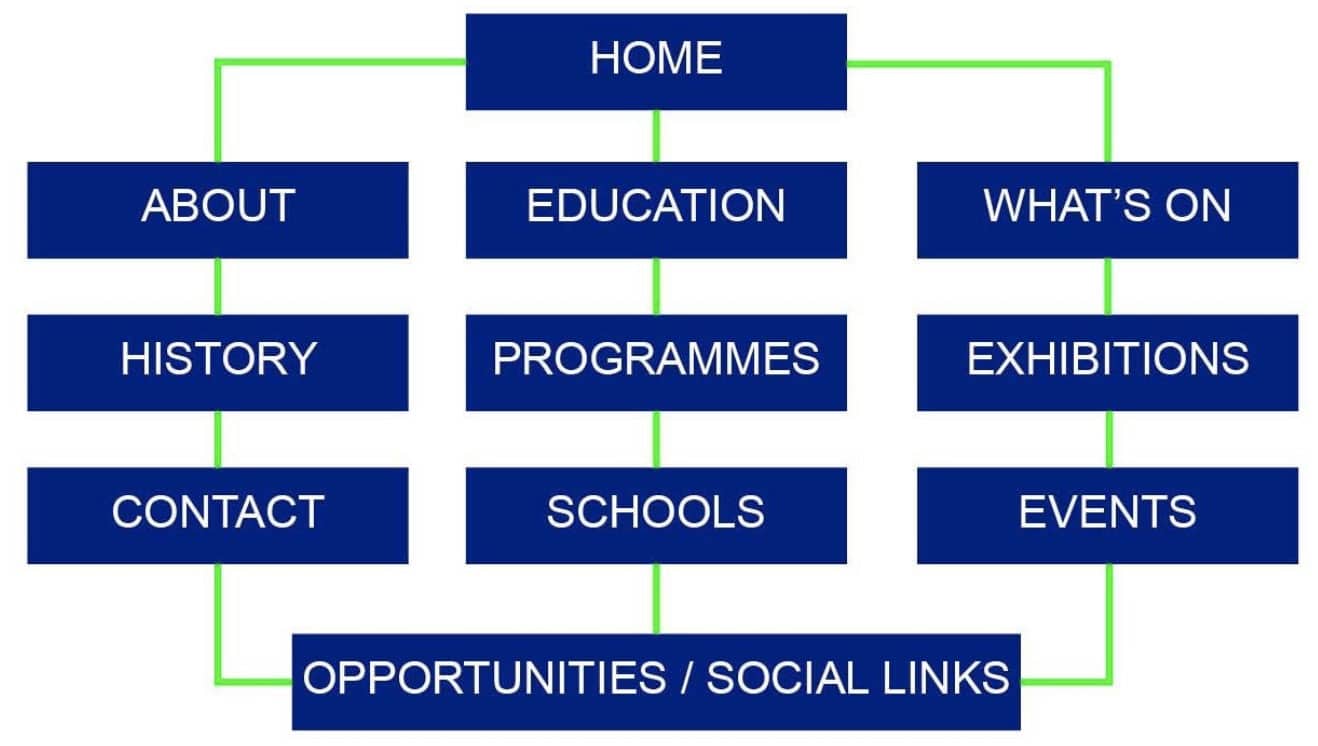
The first sitemap illustrates pages grouped into a navigable structure. Start with the information visitors need most, then decide which supporting pages belong beneath each section.
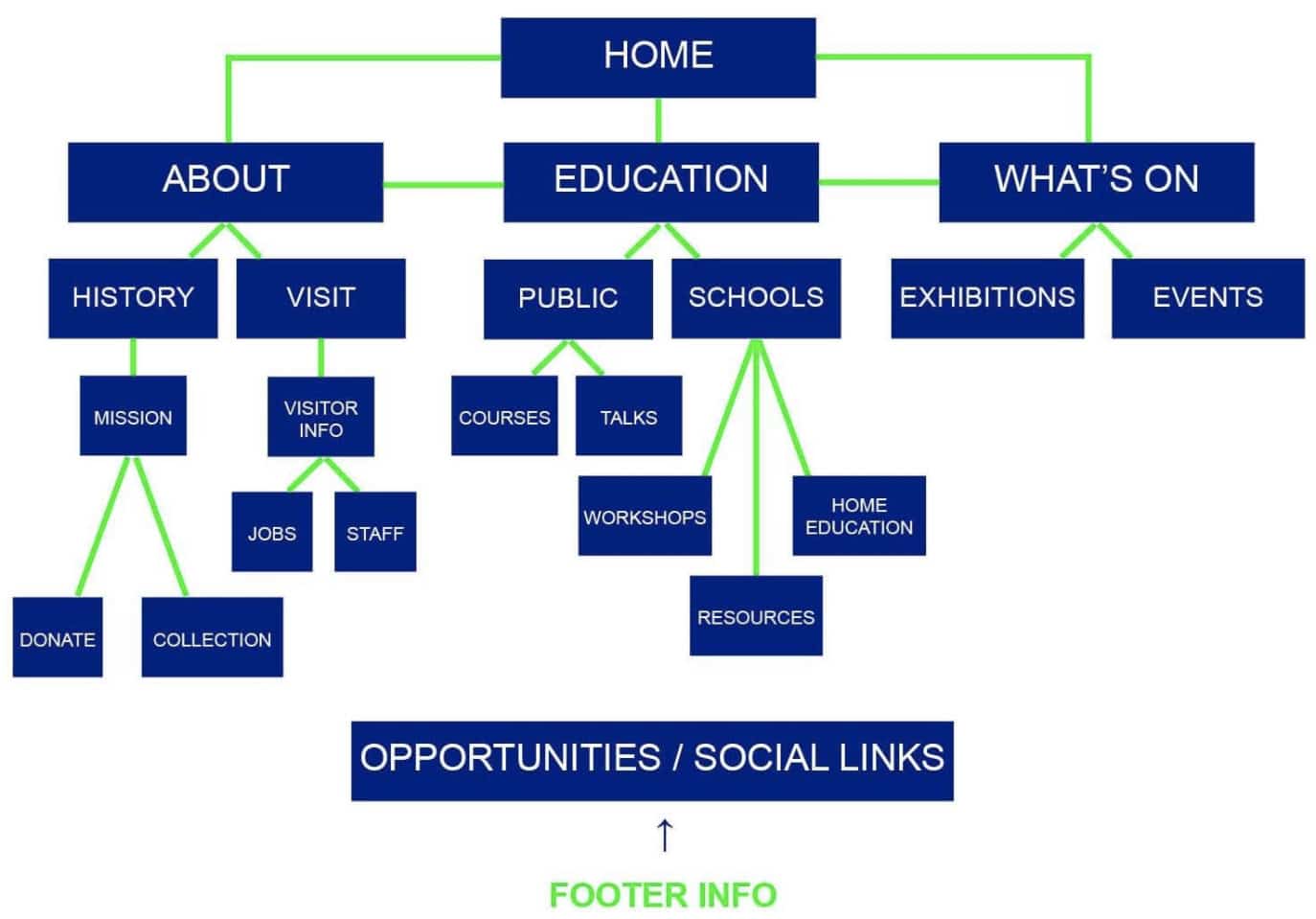
The second diagram illustrates a hierarchy of sections and subpages. A hierarchy is useful when the labels and routes make sense to visitors; it is not a guarantee of higher search rankings.
There is no mandatory three-click rule. Test whether people can find the right route, understand each step and finish the task. Extra steps may be justified in a complex booking, while even one unclear link can stop someone. If the structure cannot support the main journeys, use those findings to plan a museum website redevelopment.
3. Offer useful next steps
A useful museum website does not always keep people browsing for longer. Someone checking today’s opening hours may get the answer in seconds; someone booking an exhibition needs a clear route through dates, ticket choices and payment. Test those journeys on a phone with people who do not already know your museum. Note where they hesitate, what information is missing and whether they finish. Those observations give you a better improvement list than trying to add more clicks or another social feed.
- Related stories: pair an exhibition page with a curator’s explanation or a relevant collection story when it helps the reader.
- Contextual links: link a youth-programme page to relevant past projects or a participant’s account. These are internal links, not URL redirects.
- Clear copy: explain the next step and use descriptive link labels instead of making readers guess.
- Different formats: use video, images and text when each helps explain the subject, with captions, transcripts or other appropriate alternatives.
Do not treat longer dwell time or more clicks as proof of success, or promise that either will improve search rankings. Match the measure to the task.
4. Keep pages accessible and fast
Test navigation, forms and booking controls with a keyboard and on a phone. Check readable text, contrast, meaningful headings and useful image alternatives. Optimise image sizes and investigate slow pages, especially along the booking route.
A social feed is optional. Before embedding one, check the platform’s current official integration, loading cost, accessibility, privacy and tracking behaviour. Give visitors a useful alternative if it fails to load. A simple link to the museum’s social account may serve the purpose with less maintenance.

Historical Facebook plugin screenshot from the original 2020 article. It is not a current setup walkthrough. Confirm the supported integration before implementation.
5. Maintain a recognisable, up-to-date website
Keep your museum brand consistent across the website, email and social channels. Use the right logo variant, agreed colours and a recognisable voice while keeping the page readable and appropriate to its task.
- Keep a shared set of approved logos and basic usage rules.
- Choose colours and type that remain legible in the contexts where they appear.
- Explain the museum’s offer in language visitors understand.
- Link relevant content and remove misleading or broken routes.
- Assign owners to opening hours, closures, exhibition dates, prices and access information.
Review the main journeys after meaningful changes, including updates to ticketing systems. Fix problems in order of visitor impact and test the result. For the search-specific work, see our guide to SEO for museums.